
Meta AI
Meta Platforms, Inc.Productivity
4.613.74K Reviews
- Version
- 298.0.0.28.160
- Installs
- 100.00M
- Age Rating
- Everyone
Screenshots
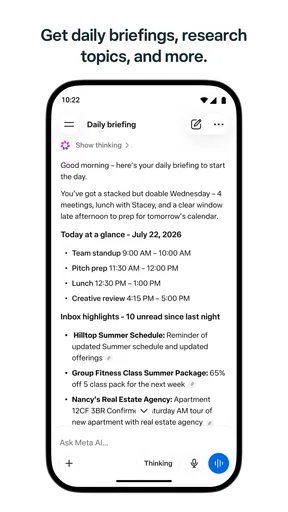

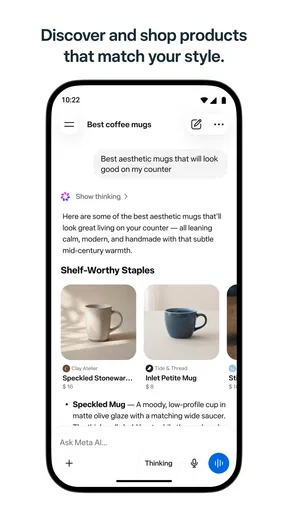
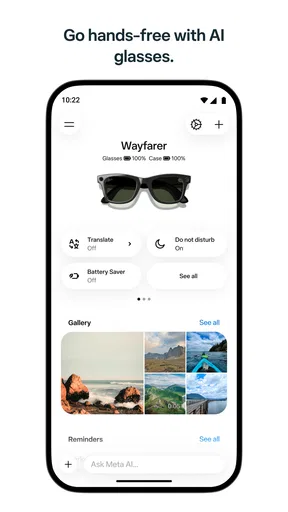
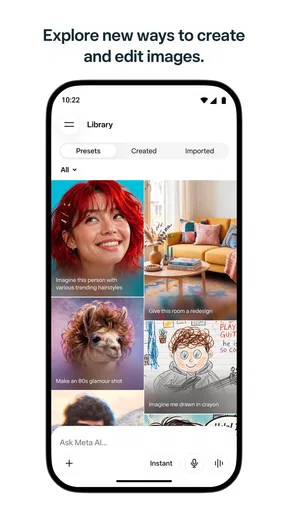
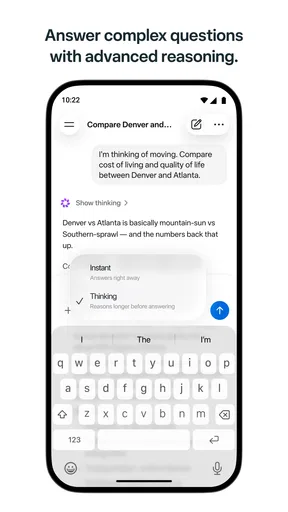
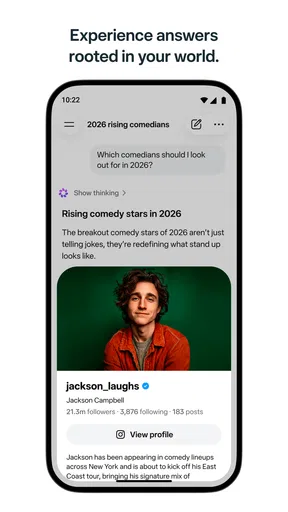
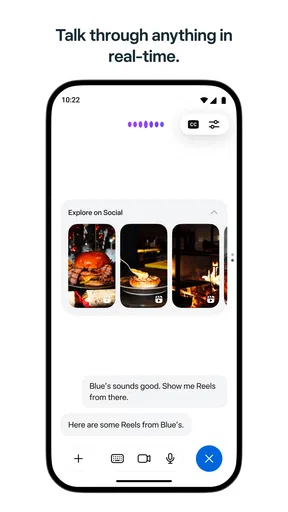
Our Review of Meta AI
 Analysis by Appyee
When I judge an AI assistant, I look beyond the novelty of asking questions: I want to know what choices I can make, what information I’m comfortable sharing, and whether the tool fits the way I already work. Meta AI - Vibes & AI Glasses is a free productivity app from Meta Platforms, Inc., and its appeal is the chance to use Meta’s AI experience alongside compatible smart glasses. That combination may be convenient, but it also makes it worth thinking carefully about when a spoken request or a device connection is appropriate.
Start with the task, not the novelty
I find an AI assistant most useful when I give it a modest, clear job: explain a term, help shape a short message, or suggest a few ways to organize an idea. Those are good moments to judge whether an answer is actually useful, rather than accepting a confident-sounding response at face value. For anything important, I would check the result against a reliable source or my own knowledge.
That distinction matters in everyday productivity. Asking for a rough outline can save me from a blank page; asking the app to make a consequential decision would be a different proposition. I treat its output as a starting point to review, not as a final authority. The app’s broad promise is most compelling for quick questions and creative nudges, where I can evaluate the answer before acting on it.
Trust depends on the moment
Using AI in a private text field feels different from speaking to it while other people are nearby. If I’m asking a general question at home, the social context is simple. In a shared office, on public transport, or while talking with someone, I would pause before saying anything personal or confidential aloud. That is a practical boundary I can control without needing to make assumptions about how a service handles information.
I also avoid putting passwords, financial details, private work material, or identifying information about someone else into an AI prompt unless I have a clear reason and understand the relevant choices. That is sensible with any assistant, not a claim about a particular data practice. For sensitive work, a tool approved by my organization is usually a better fit than a general-purpose consumer assistant.
Make your own choices visible
My approach is to review the app’s current in-app settings and the permission requests shown by my device, then grant only what makes sense for the task I want to do. I don’t assume that every permission is required, or that a feature will work without one; I decide based on the explanation presented at the time. If I’m not comfortable with a requested access, I can stop and reconsider whether that feature is worth using for me.
It is also worth checking which account is active before using an assistant on a shared or borrowed device. I would keep personal prompts separate from anything I would not want associated with my account, and I would review the controls that are actually available in the app rather than relying on a general idea of how AI tools work. The useful principle is simple: make deliberate choices before sharing, not after.
Getting Started with Meta AI - Vibes & AI Glasses
First things first, let’s talk about the setup. Downloading the Meta AI - Vibes & AI Glasses app is a breeze. Available on both Android and iOS, the app guides you through a seamless setup process. Within minutes, you’re ready to sync your glasses and dive into a new, augmented reality.
The interface is super intuitive. You’ll find everything you need neatly organized, which means less time fumbling around and more time experiencing the magic. Plus, the app's tutorial is surprisingly engaging, making it easy even for the less tech-savvy folks out there.
Features That Stand Out
Okay, let’s dive into the juicy stuff—features! The app integrates seamlessly with the glasses, offering real-time notifications, navigation assistance, and even language translation. Imagine walking down a street in a foreign country and having signs translated directly in your line of sight. Pretty cool, right?
One feature I absolutely love is the mood tracker. It uses subtle visual cues to reflect your mental state, almost like having a mood ring for your eyes. It’s these little touches that make the experience feel so personalized and unique.
Another standout is how the app handles notifications. It smartly filters what’s important and what can wait, ensuring you’re not overwhelmed by constant pings while still staying in the loop. It’s all about balance, and this app nails it.
Performance and Usability
Let’s talk performance. The app runs smoothly, with minimal lag, which is crucial for an experience this immersive. Battery life is always a concern with smart devices, but Meta has done a stellar job optimizing power consumption. You can easily get through a day with moderate use.
The usability is off the charts. The voice commands work like a charm, and the touch gestures on the glasses are responsive and intuitive. Whether you’re a tech wizard or a newbie, you’ll find the interface easy to navigate.
A practical way to test the fit
Before making this part of my routine, I would test it with a low-stakes task: ask a general question, see whether the response is clear, and decide whether the interaction feels comfortable in the setting I’m in. That gives me a better sense of the experience than trying to use an assistant for a complicated project on day one. If a feature involves connected glasses, I’d also check that the device and app are behaving as I expect before relying on them while moving around.
For a traveler, a useful workflow might be to use AI for a quick explanation or a draft phrase, then verify anything that affects directions, timing, or an important conversation. For a busy parent, it might be a short idea-generation task while planning the day. In both cases, the app is an aide, not a replacement for checking details or paying attention to the people and surroundings nearby.
Where it fits among other tools
Compared with a conventional productivity app, an AI assistant is less about storing a carefully organized record and more about responding to a prompt in the moment. A notes app is better when I need dependable long-term reference; a calendar is better for appointments and reminders; a search engine is often preferable when I need to inspect several sources. Meta AI makes more sense when I want a conversational first step, especially if I already use compatible glasses and value hands-free interaction.
That convenience has a trade-off: conversational answers can sound polished without being complete, while a traditional search gives me more direct control over which sources I read. I would not choose this app as my only tool for research, precise record-keeping, or a workflow that depends on a guaranteed answer. The best use is narrower and more realistic: reduce friction on small tasks, then use the right specialist tool for the rest.
Who is likely to appreciate it?
I can see the appeal for people who enjoy experimenting with AI, want help getting an idea started, or already have compatible smart glasses and prefer a quick spoken interaction. It may also suit someone who wants to explore an assistant without paying for the app itself. The app is free, has an Everyone age rating, and has a 4.7 average from around 863,000 ratings, with over 10 million installs. Those figures suggest broad uptake, but they don’t tell me whether its particular features suit an individual’s needs.
I’d be less enthusiastic if I needed a strictly offline tool, a dependable source of professional advice, or a conventional productivity system with structured task management as its main purpose. Someone who dislikes speaking to an assistant, especially around other people, may find the hands-free angle more awkward than useful. And if I didn’t own or plan to use compatible glasses, I’d first decide whether the app’s AI functions alone meet my needs rather than assuming the wearable experience is essential.
Questions worth settling before relying on it
Do I need glasses to try the app? The app is presented as an AI experience as well as a companion for glasses, but the specific setup and availability of functions can depend on the device and the current app experience. I would install it and check what is offered on my own phone before buying hardware for a feature I have not tried. Is it suitable for sensitive information? I would keep confidential or identifying details out of prompts unless I had reviewed the relevant controls and had a clear reason to share them.
Can I trust every answer? No AI assistant should be treated as infallible; I would verify details that could affect health, money, safety, or work. Is it a replacement for search or notes? Not in my view: it can help formulate an idea or answer a quick question, while search is stronger for comparing sources and notes are stronger for preserving information in a predictable way. These boundaries make the app easier to use wisely.
What to check as the app changes
The app’s current version is 251.0.0.61.166, and it requires Android 10 or later on Android devices. As with any app that evolves, I would look at the current interface after an update instead of assuming that a familiar screen, control, or workflow has stayed exactly the same. If I’m pairing glasses, I’d follow the instructions shown in the app at that time and confirm the connection before depending on it.
For a simple daily test, I might ask for a few ideas for a meal plan, then adapt them to what I actually have at home. I would not treat the result as a personalized dietary assessment; the value is in getting unstuck. The same pattern works for drafting a polite note or finding a plain-language explanation: provide only the context needed, inspect the answer, and make the final choice myself.
Final Thoughts
Overall, Meta AI - Vibes & AI Glasses offers an impressive blend of functionality and style. It’s more than just a gadget; it’s a glimpse into the future of connectivity. If you’re looking to upgrade your tech game and experience the world in a whole new way, this app is definitely worth checking out.
Whether you’re commuting, traveling, or just chilling at home, these glasses provide a seamless way to stay informed and entertained. So, what are you waiting for? Dive into the future with Meta AI - Vibes & AI Glasses and see the world like never before.
My more cautious recommendation is to approach it as a convenient assistant to try, not as a complete productivity system or an authority you should follow without checking. I’d start with ordinary, low-risk questions, keep private details private, and use the app’s visible choices and my device’s permission prompts to decide what feels acceptable. If that balance suits you—and you’re interested in the connected-glasses experience—there is a reasonable case for giving it a try.
Privacy and Permissions
See what permissions an app requests and how it handles your data.
- Identity
- find accounts on the device
- Contacts
- find accounts on the device, read your contacts
- Location
- approximate location (network-based), precise location (GPS and network-based)
- SMS
- read your text messages (SMS or MMS), receive text messages (MMS), receive text messages (SMS), send SMS messages
- Phone
- read call log, read phone status and identity
- Photos/Media/Files
- read the contents of your USB storage, modify or delete the contents of your USB storage
- Storage
- read the contents of your USB storage, modify or delete the contents of your USB storage
- Camera
- take pictures and videos
- Microphone
- record audio
- Wi-Fi connection information
- view Wi-Fi connections
- Device ID & call information
- read phone status and identity
- Other
- view network connections, pair with Bluetooth devices, access Bluetooth settings, change network connectivity, connect and disconnect from Wi-Fi, full network access, change your audio settings, run at startup, control vibration, prevent device from sleeping
Verdict
Strengths of Meta AI
- Intuitive user interface, easy to navigate.
- Seamless integration with AI glasses.
- Real-time translation feature is impressive.
- Wide range of languages supported.
- Customizable AI responses enhance personalization.
Limitations of Meta AI
- Requires constant internet connection.
- Limited offline functionality.
- High battery consumption on prolonged use.
- Compatibility issues with older devices.
- Subscription needed for premium features.
Other Releases by Meta Platforms, Inc.
View All


Similar Picks in This Category
View All
Google Calendar
Google LLC4.6

Google Drive
Google LLC4.3

Google Assistant
Google LLC3.9

Microsoft OneDrive
Microsoft Corporation4.6

Samsung Calendar
Samsung Electronics Co., Ltd.4.1

Microsoft OneNote: Save Notes
Microsoft Corporation4.6
Frequently Asked Questions
What is Meta AI - Vibes & AI Glasses?
Meta AI - Vibes & AI Glasses is an innovative application that seamlessly combines augmented reality with artificial intelligence to enhance your visual experiences. By using AI-powered smart glasses, it allows users to interact with digital content overlaid on the real world, offering features like virtual try-ons, interactive games, and immersive educational tools.
What are the main features of Meta AI - Vibes & AI Glasses?
The app offers a variety of features, including real-time AR overlays, AI-driven insights, and personalized content recommendations. Users can enjoy interactive games, virtual try-ons for fashion and accessories, and educational AR experiences. The app also provides seamless integration with existing smart devices and social media platforms for sharing experiences.
Is Meta AI - Vibes & AI Glasses compatible with all devices?
Meta AI - Vibes & AI Glasses is designed to work with iOS and Android devices that support augmented reality capabilities. However, to fully utilize the app's features, you may need compatible smart glasses. Ensure your device meets the necessary specifications to experience the app's full potential without any performance issues.
How secure is my data with Meta AI - Vibes & AI Glasses?
Meta AI prioritizes user privacy and data security. The app uses advanced encryption to protect personal information and does not share data with third parties without user consent. Users can control their privacy settings within the app, ensuring transparency and security in how their data is handled and stored.
Are there any in-app purchases or subscriptions required?
Meta AI - Vibes & AI Glasses offers a free version with basic features, allowing users to explore its core functionalities. However, for access to premium content, enhanced features, and personalized experiences, users may opt for in-app purchases or a subscription plan. This ensures a tailored experience for those seeking more advanced capabilities.
